How To Create and Send a Birthday Reward
Birthday Rewards
Birthday Rewards allow you to automatically send a reward to customers during their birthday month. TapWyse handles the entire process from identifying eligible customers to delivering and expiring rewards so you can create a consistent engagement touchpoint with minimal effort.
How It Works
- On the first day of each month, customers with a birthday in that month receive a reward
- Rewards are valid through the end of the month
- Customers who join mid-month will still receive a reward if they add their birthday
- A customer can only receive one Birthday Reward in a 10 month period
Before You Begin
Birthday Rewards require the Birthday Month field to be enabled. If you do not see the birthday month as available column on your Customers List, email TapWyse to have it enabled.
How To Create A Birthday Reward
Step 1: Create the Reward
- Go to Rewards Section of the Customer Dashboard
- Click Create Reward
- Build out reward details and save (see How To Create and Send Rewards to your App Customers for detailed instructions)
Step 2: Add the Reward to the Birthday Rewards Section
- Click the “Birthday Rewards” tab in the rewards section of the Customer Dashboard
- Click Create
- Select your Birthday Reward from the dropdown menu
Step 3: Enable Birthday Rewards
Toggle Enable ON in the Birthday Rewards Settings
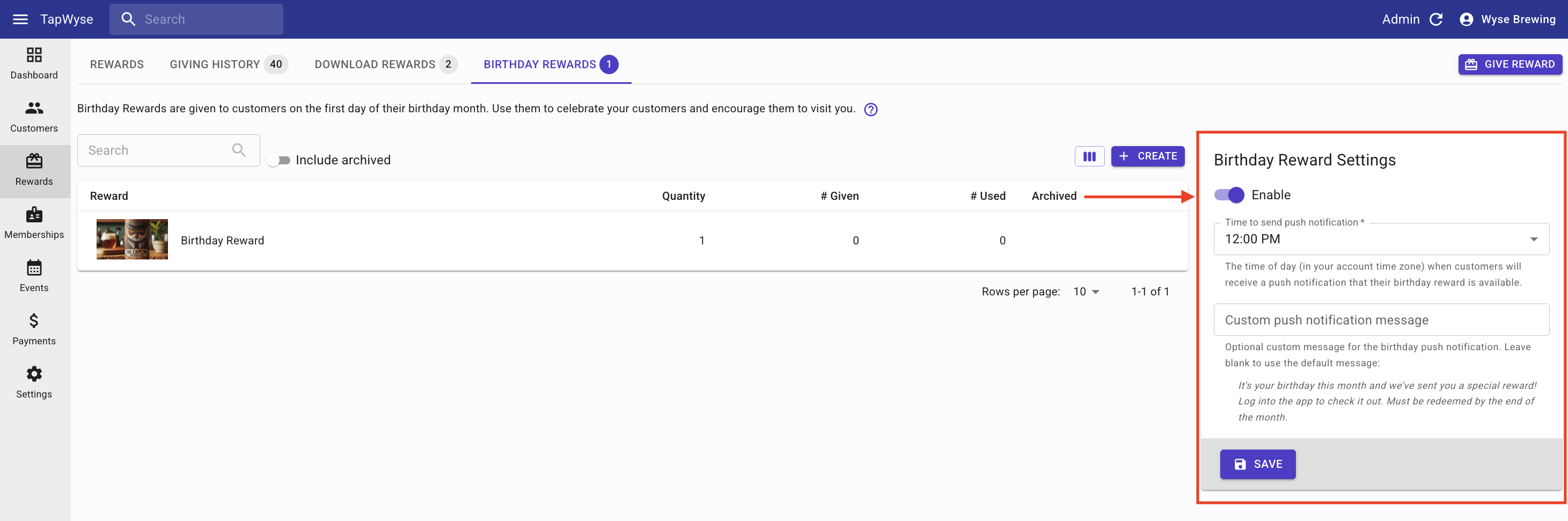
Step 4: Customize Notifications (Optional)
You can adjust how customers are notified:
Notification Time
The time of day (in your account time zone) when customers will receive a push notification that their birthday reward is available.
The time of day (in your account time zone) when customers will receive a push notification that their birthday reward is available.
Notification Message
Default message:
It’s your birthday month and we sent you a special reward. Log in to the app to check it out. Must be redeemed by the end of the month.
This message can be edited to match your brand voice.
Default message:
It’s your birthday month and we sent you a special reward. Log in to the app to check it out. Must be redeemed by the end of the month.
This message can be edited to match your brand voice.
Managing Birthday Rewards
From the Birthday Rewards tab, you can track the total number of rewards sent and received, view a more detailed customer redemption history, and archive your birthday reward.
To track the number of Birthday Rewards sent and redeemed:
- View the # Given and # Used columns
To see a more detailed history of the Birthday Reward redemptions:
- click the reward
- Then click on VIEW HISTORY
To archive a Birthday Reward
- Toggle "Is Archived" ON
- Click SAVE
Migrating Preexisting Birthday Data
If you previously collected birthdays using a custom field, we’ve got you covered! We’ve taken the time to identify customers that were already collecting this data and migrated it over to the birthday month field.
If you have been collecting birthday information, and do not see the birthday month column as an option on your customer list, please reach out to us, and we can work on migrating your existing information.
FAQ
When are birthday rewards sent?
Rewards are sent on the first day of the customer’s birthday month.
Do customers receive rewards on their exact birthday?
No, rewards are issued for the full month, not a specific day.
What if a customer signs up during their birthday month?
They will receive a reward once they add their birthday.
How long are rewards valid?
Rewards expire at the end of the birthday month.
Can customers receive multiple birthday rewards?
No, customers cannot receive another birthday reward within 10 months, even if they update their birthday.
You can also disable customer ability to edit birthday information (See How Customer Fields Work for editing instructions)
You can also disable customer ability to edit birthday information (See How Customer Fields Work for editing instructions)
Can I customize the notification message?
Yes, notification messaging is fully editable.
Can Birthday Rewards be disabled?
Yes, you can turn off Birthday Rewards or archive individual rewards at any time.
What if I already use Birthday Rewards in my memberships?
Everyone has a birthday! That’s why we made this new birthday reward feature a universal tool for engaging with all customers. If you currently have a birthday reward tied to a membership, we recommend replacing it with a new comparable reward and creating a birthday reward for everyone. If you would prefer to keep the birthday rewards exclusively members only, you can leave things as is.